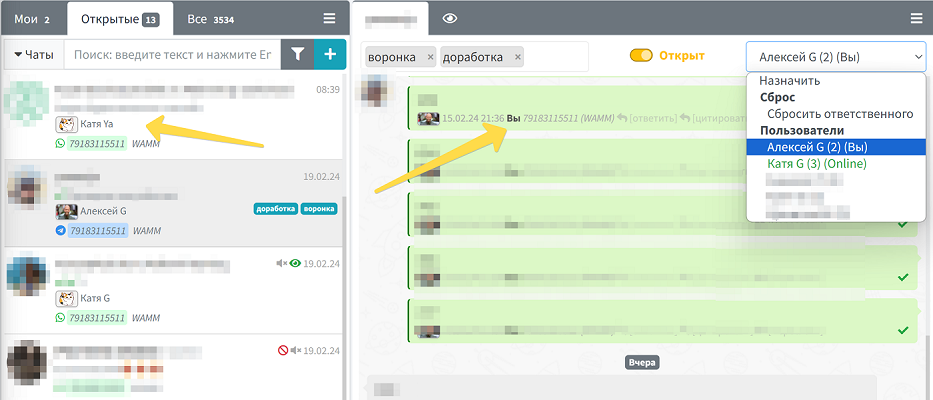
The person responsible for a chat is the program user who conducts the dialogue in a specific chat. Their name and, if available, avatar are displayed in the chat list under each message they send. This feature is one of the key tools for effectively organizing the work of a support or sales team.
Benefits of Assigning Chat Responsibilities
The function of assigning responsible persons becomes critically important when a company has several employees handling numerous requests or managing specific clients. Proper distribution of responsibility allows you to:
- Eliminate situations where no one responds to a client
- Prevent duplicate responses from different employees
- Ensure a personalized approach for each client
- Evenly distribute the workload among employees
- Track the performance of each employee
- Create a complete history of communication with the client
How a Responsible Person is Assigned
There are several ways to assign a responsible person for a chat in WAMM.chat:
- Automatic Assignment - the user automatically becomes responsible when sending the first message in a new chat.
- Manual Assignment - an administrator or another user can manually assign a responsible person by selecting them from the list in the upper right corner of the chat window.
- Group Assignment - if User Groups are configured, the chat can be assigned to a group, and the system will automatically select a specific responsible person according to a set algorithm.
Additionally, the responsible person can be changed at any time, or this function can be completely removed (deactivated) for a specific chat.
If desired, auto-assignment can be disabled individually in the User Profile - using the toggle "Assign as responsible when sending a message." This is convenient when chats are assigned to specific managers, and colleagues only write in them temporarily: in such a case, the original responsible person is retained.
Important: A responsible person can only be assigned for personal chats. This function is not available for group chats and channels due to their structure and purpose.
Configuring Notifications for Responsible Persons
In the Profile section, each user can flexibly configure notifications for new messages:
- Choosing a notification channel - to the computer desktop (with or without sound) or to a personal Telegram
- Filtering notifications - you can receive notifications:
- From all chats
- Only from new ones (without a responsible person) and those where the user is the responsible person
- Only from your own chats (where the user is the responsible person)
This flexible notification system allows each employee to customize alerts for their tasks and avoid information overload.
Automatic Reset of the Responsible Person
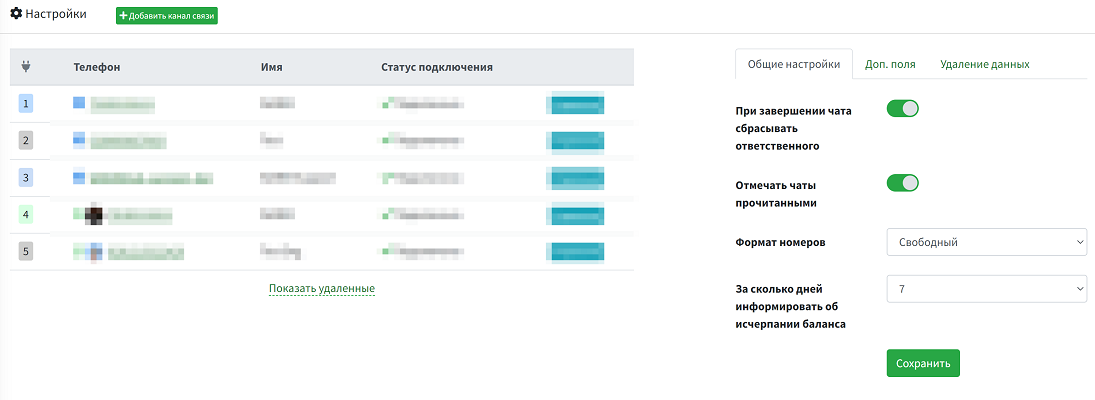
WAMM.chat has a useful setting that allows automatically resetting the responsible person for a chat when the chat ends. This is especially convenient for support services, where after resolving a client's issue, the chat is closed, and when a new inquiry comes from the same client, any available operator can handle it.
By default, this setting is disabled. Only a user with the Administrator role can enable or disable it in the Settings section.
Integration with Other Features
The function of assigning a responsible person is integrated with other WAMM.chat capabilities:
- Chat Filtering - you can filter chats by the responsible user
- Reports - analyze the performance of each employee based on their chats
- API - programmatically assign responsible persons through integrations with external systems
Business Use Cases
The "Responsible for Chat" function works effectively in various business scenarios:
- Sales Department - assigning managers to specific clients to manage deals from first contact to completion
- Support Service - distributing inquiries among operators considering their workload and expertise
- Multi-Level Support - reassigning complex questions to second-line specialists
- Educational Projects - assigning teachers to students for personalized learning
- Medical Consultations - distributing patients among doctors of different specializations
Proper organization of work with chat responsible persons helps improve the quality of customer service and team efficiency, which directly impacts your business success.