The chat filtering function in WAMM.chat allows you to efficiently manage large lists of conversations and quickly find the chats you need. By default, the chat list is sorted by the time of the last message or by the presence of unread messages - these settings are available in the User Profile or through the chat list menu.
Filter Parameters
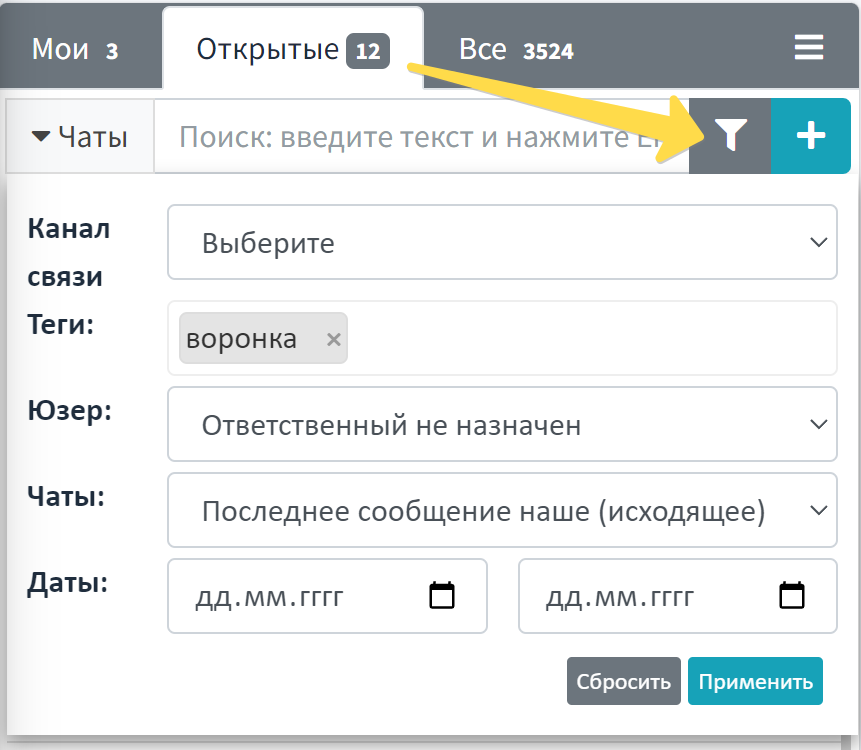
For a more precise search of the necessary conversations, you can use the following filter parameters:
- Communication Channel - displays chats only from selected messengers: WhatsApp, Telegram, Telegram Bot, MAX, MAX Bot, Avito. You can select multiple channels at once.
- Tags - displays chats with specific tags that you have assigned previously
- User - filters by the employee who sent messages in the chat
- Messages - allows you to filter chats without messages or chats where the last message was incoming or outgoing
- Message Date - shows chats that had activity within a selected time period
- Multiple selection also works for other parameters: you can select several responsible persons, several tags, etc. at the same time. The header of the chat list displays the number of chats matching the filter - no need to recalculate manually.
How to Use the Chat Filter
To activate filtering:
- Click the funnel icon button located above the chat list
- In the window that opens, select the necessary filter parameters
- Click the "Apply" button to activate the filter
- To cancel filtering, use the "Reset" button
Features of Working with the Filter
It is important to note that the filter applies to the current active tab (My, Open, All). When switching between tabs, the filter is preserved and applied to the content of the new tab.
If a chat filter is applied, the counter automatically switches and shows the number of filtered chats, not the total on the tab. This is convenient for "here and now" analytics - for example, how many chats with a specific tag or assigned to a particular manager.
Practical Application
Chat filtering is especially useful in the following business scenarios:
- For Customer Support - quick search for inquiries by specific tags or filtering by period to analyze peak loads
- For Sales Department - tracking chats with potential clients by tags like "Potential Client", "Requires Response", etc.
- For Managers - analyzing employee performance by filtering by users who sent messages
- When Handing Over Tasks - filtering chats without replies or with incoming messages for prompt processing of unresolved inquiries
The filtering function is closely related to other chat organization tools in WAMM.chat: chat sorting, tag system, and assigning responsible persons. By combining these features, you can create an effective system for managing customer inquiries.
Use chat filtering to increase work productivity and reduce time spent searching for necessary information, especially when dealing with a large number of active conversations.