Register and start using the service immediately, with the first 3 days free. This will allow you to get acquainted with WAMM.chat and evaluate its features for solving your tasks.
- Go to https://wamm.chat, then click the Registration link, enter your email, name, and set a password.
- The service will then send you an email to confirm your email address. Open your inbox and follow the link in the email.
- This completes the registration, and you can start working.
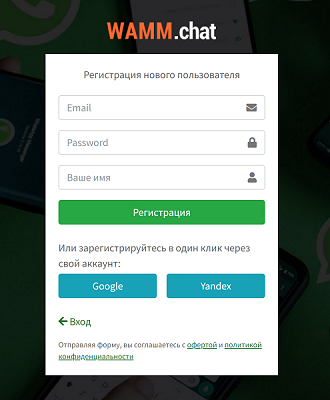 personal account registration window
If you have a Google, Yandex, or VK account and are logged into them, you can register by simply clicking the corresponding buttons on the registration form. In this case, email confirmation is not required, and you can also log into WAMM.chat by clicking the Google, Yandex, or VK button.
Additional account users - your colleagues/operators - you invite by adding them in the Users section. A login and password will be sent to their email for access; they do not need to register independently or create a separate personal account. If a user has registered independently and created a separate personal account, they can contact support, and we will delete that account.
One email for multiple accounts. If you already have a WAMM.chat account and need to create another one - for example, for a different department or business line with its own set of channels and users - you can register a new account with the same email. When logging in with this email, the system will prompt you to choose which account to access. You can freely switch between accounts as needed.
Before registering, please review the Offer Agreement and Privacy Policy. Acceptance and conclusion are made by registering an account or paying for services.
What's next? Check out the following possible steps: