WAMM.chat provides administrators with the ability to export a list of clients and chat history from all connected messengers (WhatsApp, Telegram, MAX, and Avito) as Excel spreadsheets. This is useful for quality control of manager performance, analytics, and transferring the client database to a CRM.
How to Perform an Export
Go to the additional menu above the chat list and select the "Export chats and messages" option.
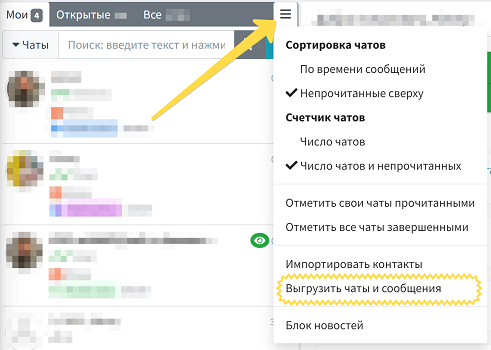
Configuring Parameters
Configure the export parameters to suit your business needs:
- Select Communication Channel: Export data for a specific messenger or for "All Channels" simultaneously to get a unified client database.
- Export Period: Specify the date range for the chat history.
- Exclude Groups: Check the "Exclude group chat messages" box to remove unnecessary noise.
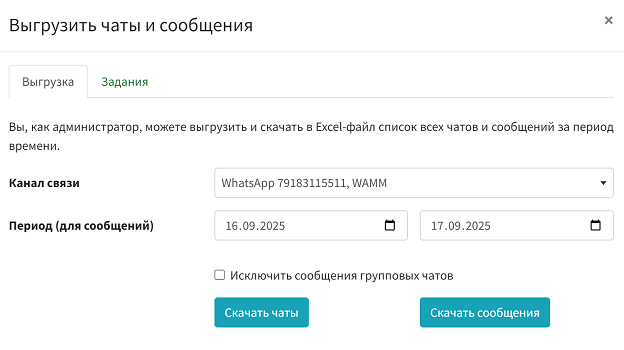
Launch and Download Modes
Select the required data type for download:
- Download Chats: A summary list of your clients (contacts) with their tags, notes, and communication channels. When selecting a single channel, the file will download immediately.
- Download Messages: A complete log of all correspondence (incoming and outgoing messages) for the selected date range.
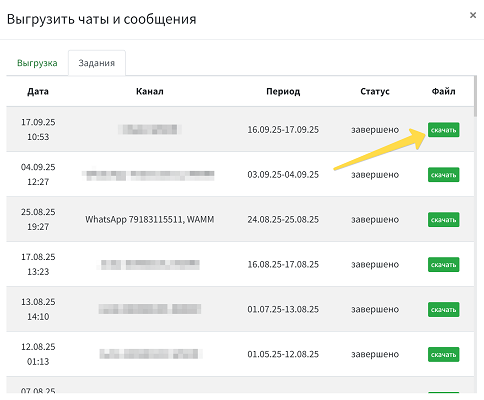
"Tasks" Tab - Background Export
Preparation of large files (e.g., correspondence across all channels) happens automatically in the background. You can close the export window and continue communicating with clients.
The file readiness status is displayed on the "Tasks" tab:
- in progress - the system is gathering information;
- completed - the file is ready, click the green "download" button.
Structure of Exported Files
WAMM.chat generates neat tables, ready for import into a CRM or analysis in Excel:

1. "Contacts" File (Chat List)
- Name - the client's name in the messenger or contact card.
- Phone - phone number (or "Group" label).
- Phone (TG/MAX) - actual phone number or internal ID.
- Tags - all tags assigned to the chat (separated by semicolons).
- Message - date of last contact.
- Message Status - delivery status ("incoming", "sent", etc.).
- Notes - notes, email, and website from the client's contact card.
- Channel - name and phone number of your WAMM channel (marked "DELETED" if the channel is disabled).
2. "Messages" File (Chat History)
- Message ID - unique number in the database.
- Date and Time - exact time of sending or receiving.
- Phone / Chat ID and Phone (TG/MAX) - client identifiers.
- Direction - label "incoming" or "outgoing".
- Message Text - dialogue text or link to an attachment.
- Username - name of the operator who responded to the client.
- Broadcast ID - mass broadcast number if the message is automatic.
- Sender Channel - name and phone number of the channel through which the dialogue was conducted.
Important Notes
- File Language: Tables are automatically translated into your interface language (Russian, English, or Spanish).
- Media File Storage Period: Links to media files (images, documents) are active for 60-180 days. After this period, the table will display the text "media file (expired for download)".
- Security: The export button is available only to users with Administrator rights; operators do not have access to the database.