Mass Messaging via Messengers WhatsApp, MAX, and Telegram using the WAMM.chat program is a fast and effective way to improve interaction with your clients.
Features of our messenger broadcasting service: sending via WhatsApp, MAX, and Telegram; setting the time and interval of sending; message personalization; attaching files and images.
Contact Sources:
- Upload from an Excel file, file structure (Example files: with text, with fields, numbers only):
- "Phone" column (mandatory)
- "Message" column and optional columns for personalization
- Upload from the WAMM.chat database
- Manual contact entry
Do not send SPAM messages, only send messages to your client base who have consented to receive broadcasts. Also, be aware of the risks that your number may be blocked by messenger moderators. This can happen if recipients file complaints about your messages. Read the note Risks of Broadcasting in Messengers.
You need to register and connect your WhatsApp, MAX, or Telegram number in the Settings section. You can connect any number of numbers for broadcasting or send from different numbers. Go to the Message Broadcasting section and follow the simple steps.
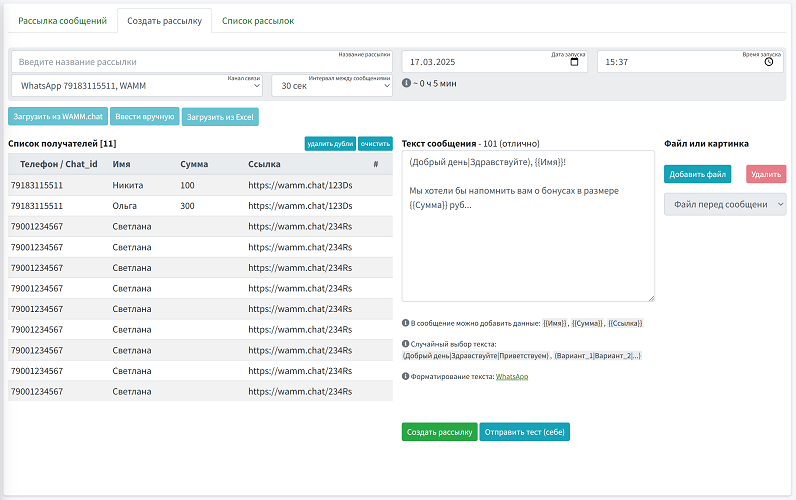
Process of Creating a Broadcast for a Client Base:
- Selecting the communication channel (WhatsApp, MAX, Telegram)
- Setting the start time and sending interval
- Uploading the recipient list
- Entering the message text
- Using a common template
- Text from the imported file
- Adding files or images. You can add not just one file, but several at once - all will be sent to one recipient sequentially.
- You can assign a tag and a responsible employee to chats from the broadcast
- Starting the broadcast
- Viewing the broadcast progress report (sent, received, reply received)
You can export reports for multiple broadcasts at once: select the desired ones and click the common export button. The report will include a column with the channel from which the broadcast was made.
Before or during the broadcast, you can edit it - change the sending interval and communication channel without recreating it from scratch.
Phone numbers for broadcasting do not necessarily have to be in international format (i.e., for Russia +7*** or 7***). Broadcasts are sent normally to WhatsApp and MAX for numbers starting with 8 (8XXX), and to Telegram for numbers with spaces, dashes, brackets, and other formatting characters. The system normalizes the number itself before sending.
Before sending, the phone is checked against your contacts, and if it is not in your contacts, it checks whether the number has WhatsApp, MAX, or Telegram.
The message text in broadcasts can contain up to 1500 characters.